tl;dr: use a serial terminal which can buffer input and send it all at once, lines should end with \CR\LF.
I'm am currently working on bringing up a LoRa network in Bahía Blanca. Parts of the nodes I need to set up are made by RAK Wireless.
According to their documentation the nodes can be configured by using a serial connection to them. So I quickly turned to minicom for it, with no avail. Somehow I could read whatever the device was writing to my machine but could not write any commands back to it.
In order to get the issue solved I switched to running their RAK serial port tool under wine. Making it work made me download and install a huge amount of Windows libraries and tools, but in the end I wanted a Linux-only solution.
After much digging the web, trial and error I've found a way to solve this:
Commands should end with \CR\LF.
The command needs to be sent quickly, all in one go, trough the serial port. This means it can't be typed and sent as normal serial consoles.
The solution for (1) in minicom is easy, but I don't know if minicom is capable of doing the buffering thing, so I went to use cutecom, for which one has to enter the input and send it all at once.
I have been quite absent from Debian stuff lately, but this increased since COVID-19 hits us. In this blog post I'll try to sketch what I have been doing to help fight COVID-19 this last few months.
In the beginning
When the pandemic reached Argentina the government started a quarantine. We engineers (like engineers around the world) started to think on how to put our abilities in order to help with the situation. Some worked toward providing more protection elements to medical staff, some towards increasing the number of ventilation machines at disposal. Another group of people started thinking on another ways of helping. In Bahía Blanca arised the idea of monitoring some variables remotely and in masse.
Simplified Monitoring of Patients in Situations of Mass Hospitalization (MoSimPa)
This is where the idea of remotely monitored devices came in, and MoSimPa (from the spanish of "monitoreo simplificado de pacientes en situación de internación masiva") started to get form. The idea is simple: oximetry (SpO2), heart rate and body temperature will be recorded and, instead of being shown in a display in the device itself, they will be transmitted and monitored in one or more places. In this way medical staff doesn't has to reach a patient constantly and monitoring could be done by medical staff for more patients at the same time. In place monitoring can also happen using a cellphone or tablet.
The devices do not have a screen of their own and almost no buttons, making them more cheap to build and thus more in line with the current economic reality of Argentina.
This is where the project Para Ayudar was created. The project aims to produce the aforementioned non-invasive device to be used in health institutions, hospitals, intra hospital transports and homes.
It is worth to note that the system is designed as a complementary measure for continuous monitoring of a pacient. Care should be taken to check that symptomps and overall patient status don't mean an inmediate life threat. In other words, it is NOT designed for ICUs.
A vast majority of Covid pneumonia patients I met had remarkably low oxygen saturations at triage — seemingly incompatible with life — but they were using their cellphones as we put them on monitors. Although breathing fast, they had relatively minimal apparent distress, despite dangerously low oxygen levels and terrible pneumonia on chest X-rays.
This greatly reinforced the idea we were on the right track.
The project from a technical standpoint
As the project is primarily designed for and by Argentinians the current system design and software documentation is written in spanish, but the source code (or at least most of it) is written in english. Should anyone need it in english please do not hesitate in asking me.
General system description
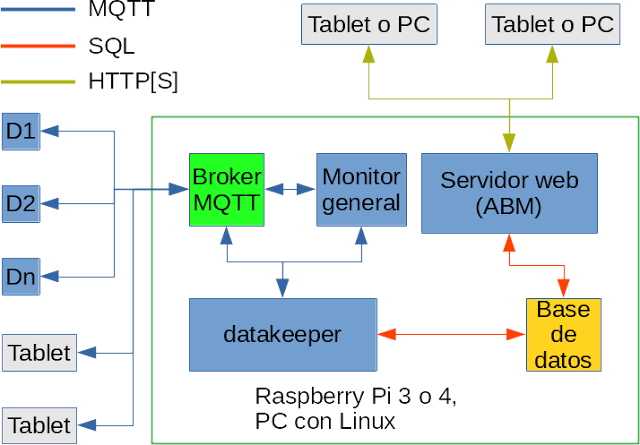
The system is comprised of the devices, a main machine acting as a server (in our case for small setups a Raspberry Pi) and the possibility of accessing data trough cell phones, tablets or other PCs in the network.
The hardware
As of today this is the only part in which I still can't provide schematics, but I'll update this blog post and technical doc with them as soon as I get my hands into them.
Again the design is due to be built in Argentina where getting our hands on hardware is not easy. Moreover it needs to be as cheap as possible, specially now that the Argentinian currency, the peso, is every day more depreciated. So we decided on using an ESP32 as the main microprocessor and a set of Maxim sensors devices. Again, more info when I have them at hand.
The software
Here we have many more components to describe. Firstly the ESP32 code is done with the Arduino SDK. This part of the stack will receive many updates soon, as soon as the first hardware prototypes are out.
For the rest of the stack I decided to go ahead with whatever is available in Debian stable. Why? Well, Raspbian provides a Debian stable-based image and I'm a Debian Developer, so things should go just natural for me in that front. Of course each component has its own packaging. I'm one of Debian's Qt maintainers then using Qt will also be quite natural for me. Plots? Qwt, of course. And with that I have most of my necessities fulfilled. I choose PostgreSql as database server and Mosquitto as MQTT broker.
Between the database and MQTT is mosimpa-datakeeper. The piece of software from which medical staff monitor patients is unsurprisingly called mosimpa-monitor.
MoSimPa's monitor main screen
Plots of a patient's data
Alarm thresholds setup
And for managing patients, devices, locations and internments (CRUD anyone?) there is currently a Qt-based application called mosimpa-abm.
ABM main screen
ABM internments view
The idea is to replace it with a web service so it doesn't needs to be confined to the RPi or require installations in other machines. I considered using webassembly but I would have to also build PostgreSql in order to compile Qt's plugin.
Translations? Of course! As I have already mentioned the code is written in English. Qt allows to easily translate applications, so I keep a Spanish one as the code changes (and we are primarily targeting spanish-speaking people). But of course this also means it can be easily translated to whichever language is necessary.
Due to $JOB I need to work with MPLAB X (I wish I could simply open Qt Creator...). MPLAB X's installation went straightforward, but I could not make the PickIt 3 to work.
So I ran MPLAB X from a console and got:
$ /opt/microchip/mplabx/v4.15/mplab_ide/bin/mplab_ide libusb couldn't open USB device /dev/bus/usb/006/013: Permission denied.
Yes, I rebooted my machine previous to running MPLABX (a udev restart would have been enough though) but something is not yet working.
Quick and dirty solution: chmod lisandro:lisandro /dev/bus/006/013
Yes, I'll have to re do this every time I plug the PickIt, but at least I've got it working.
I'm currently developing an nRF51822-based embedded device. Being one the Qt/Qt Creator maintainers in Debian I would of course try to use it for the development. Turns out it works pretty good... with some caveats.
There are already two quite interesting blog posts about using Qt Creator on MAC and on Windows, so I will not repeat the basics, as they are there. Both use qbs, but I managed to use CMake.
Instead I'll add some tips on the stuff that I needed to solve in order to make this happen on current Debian Sid.
The required toolchain is already in Debian, just install binutils-arm-none-eabi, gcc-arm-none-eabi and gdb-arm-none-eabi.
You will not find arm-none-eabi-gdb-py on the gdb-arm-none-eabi package. Fear not, the provided gdb binary is compiled against python so it will work.
To enable proper debugging be sure to follow this flag setup. If you are using CMake like in this example be sure to modify CMake/toolchain_gcc.cmake as necessary.
In Qt Creator you might find that, while try to run or debug your app, you are greated with a message box that says "Cannot debug: Local executable is not set." Just go to Projects →Run and change "Run configuration" until you get a valid path (ie, a path to the .elf or .out file) in the "Executable" field.
El sábado 20 de Abril se va a llevar a cabo el Hardware Freedom Day en todo el mundo, y Argentina no es excepción. Este año tenemos la suerte que se realice en dos lugares: La Plata (que cuenta con Alejo como uno de los coordinadores) y Buenos Aires.
A mi me van a quedar un poco lejos, pero invito al que pueda a acercarse al evento.
Algún tiempo atrás ví un video sobre el uso de Qt en plataformas de inflight entertainment (entretenimiento en vuelo) de Panasonic:
Pensé que iba a pasar bastante hasta que viera un sistema así en vivo y en directo... arriba de un avión (lo digo porque lamentablemente no he estado pudiendo viajar mucho que digamos). La sorpresa me la dí al viajar en un vuelo de Emirates. ¡Y aún viajando en clase económica!
Por el cursor, diría que corre bajo Linux (además, si fuese un sistema operativo propietario, es muy probable que le haya visto un logo en algún lado).
La pantalla es táctil, aunque parece resistiva por como reacciona. Creo que, en ese caso, los botones que se dibujan en pantalla deberían ser un poco mas grandes.
El "control remoto/joystick/horquilla de teléfono" es muy piola. Se nota que fué construído con la premisa de robustez antes que comfort al usarlo, pero es mas que entendible por la función que cumple.
Si bien es particular a Emirates, la selección de música me pareció excelente :-) No estuve viendo las películas en mi sistema, pero si en la de otros. Había estrenos y todo. ¡Y gratis! (bueno, uno paga el pasaje ;-) ).
Mi pantalla estaba pidiendo que la recalibren un poco, la parte superior era complicada para acceder con el sistema táctil.
El "mini joystick" para mover el cursor (similar al botoncito de las notebooks para el mismo fin) resultó muy práctico.
El sistema generaba mucho calor. Bastaba con girarlo un poco y poner la mano atrás para sentirlo.
Las vistas de las cámaras inferior y delantera del avión son geniales. Y si, están encendidas todo el tiempo, por lo que podemos ver como despegamos.
En fin, golazo para Emirates, me dejaron con una muy buena impresión mas allá del servicio, que realmente fué muy bueno también.
Por las dudas: no, no trabajo en Emirates ni Panasonic ni Qt, ni estoy relacionado con ninguno de ellos.
Y digo yo, si el sistema fuese Software Libre ¿que podría mejorar?
En mi caso particular, educado como ingeniero electrónico, leer este trabajo fué sin duda una gran idea. Lo que no implica que lo pude "desglosar" totalmente, o dicho de otra manera, hay partes del texto que me siguen resultando "oscuras", pero nada que con un poco de esfuerzo no se logre comprender. Sencillamente estoy usando un algoritmo de lectura/comprensión bastante perezoso ;-)
El hecho de no tener mucha formación "formal" de software no influyó mucho sobre la comprensión del texto. Dicho de otro modo, no es excusa para no leerlo :-)
Lo único que me gustaría notar como crítica muy leve es el hecho de que no todo el texto es para todo programador. Los primeros capítulos son fundantes, aunque quizás mi óptica de hardware adquirida a través de los años me nuble la visión un poco :-) Pero sin duda ayudan a comprender muchísimo lo que pasa por dentro de una computadora. La parte que creo que no todo programador pueda llegar a aprovechar es en donde se explica como mejorar el código para casos particulares de hardware. Muchas veces lo que queremos es que nuestro software corra razonablemente bien en toda plataforma, y no que se destaque en una en particular. También es posible aplicar algo de ésta lógica a un mantenedor de paquetes de una distribución binaria, como es mi caso con Debian.
Sin embargo, vuelvo a hacer énfasis de que es una muy buena lectura.
Hace un par de semanas un amigo, S, intentó actualizar el firmware de una pedalera Zoom G9.2tt. El resultado: una pedalera en estado catatónico.
El proceso se realiza utilizando únicamente Windows (ya empezamos mal), con un software propietario (típico...) bastante viejo y a través de ¡los puertos MIDI! Y eso a pesar de que la pedalera cuenta con un conector USB.
Revisando un poco su instalación, mi primer sospechoso fué el cable MIDI, que no es otra cosa que un conversor USB ←→ MIDI. Teniendo en cuenta mi experiencia con conversores de éste tipo utilizados para una funcionalidad alternativa (tienden a no andar), le sugerí a S que se consiga una máquina con Windows y que se venga a casa, en donde tengo una placa con hardware MIDI real.
En el primer intento llegamos a un punto del proceso de reflasheado mucho mas avanzado que con el cable MIDI por USB. Pero el mismo seguía fallando dando un simple mensaje de error. Muy informativo :-(
S había leído en algún foro que mucha gente probó muchas veces hasta que finalmente anduvo. Y éso fué lo que hicimos, hasta que, en un momento, logramos terminar el proceso.
Sin embargo no todo quedó bien: la pedalera acusa que los pedales no están calibrados. Y ésto, hasta el momento, no tenemos ni idea como solucionarlo. ¿Alguien con alguna idea?
Algunos corolarios de la situación:
Cuando se va a utilizar algún medio para un uso atípico, tratar de evitar los conversores. Por ejemplo, usar un puerto paralelo mediante conversor USB puede andar para una impresora, pero es mucho mas difícil que lo haga utilizándolo para transferencias JTAG. O un cable MIDI←→USB ;-) Mejor conseguirse un cable específico o una máquina con el puerto correcto.
No sé que estaba pensando la gente de Zoom al usar los puertos MIDI para flashear una pedalera. En Windows. Uugh.
Me compré una placa M-Audio Delta 1010LT a la que quiero usar como placa por defecto. Pero las cosas ya no son como antes que bastaba desactivar la placa on board:
$ cat /proc/asound/cards
0 [SB ]: HDA-Intel - HDA ATI SB
HDA ATI SB at 0xfe024000 irq 16
1 [E320SE ]: USB-Audio - Eye 320SE
PixArt Imaging Inc. Eye 320SE at usb-0000:00:13.1-2, full speed
2 [Generic ]: HDA-Intel - HD-Audio Generic
HD-Audio Generic at 0xfdffc000 irq 19
3 [M1010LT ]: ICE1712 - M Audio Delta 1010LT
M Audio Delta 1010LT at 0xbf00, irq 21
La primera es la placa onboard, que quiero dejar activada por el momento. La segunda, el mic de la webcam. La tercera, el HDMI de la placa de video. Y la cuarta, la M1010LT.
Y acá viene el problema: la M1010LT no es la placa por defecto, por ende algunas aplicaciones no la van a usar (¿les suena flash player?). Ya me había pasado algo similar antes (la E320SE quedaba por defecto), así que recurrí al archivo asound.conf. Mi primer intento fué:
Otra vez, silencio absoluto :-/. Me cansé de buscar en la web y no encontrar soluciones. No uso pulseaudio y no sé si vale la pena usar jack. Bueno, de todas maneras las aplicaciones que usan phonon andaban bien, y para los videos podía usar los auriculares. Pero cuando uno tiene que ver un stream en vivo que dura muchas horas (¿les suena el rescate de los 33 mineros?), se hace una molestia. ¿que tal un hack rápido? Cable de audio conectado a la salida de la placa on board y en su otra punta a una de las entradas de la M1010LT. Feo, pero anda.
La "suerte" a veces ayuda.
Ayer, siguiendo un link en la web, dí con unos videos en You Tube. Me puse los auriculares, apreté play y... el sonido salía por los parlantes :S. Un cat /proc/asound/cards me decía que la M1010LT estaba como placa 0. Bien, entonces era posible usarla por defecto, mas allá de que no lo haya logrado con asound.conf. Buscando en la web un poco mas de información sobre toda la que ya busqué, dí con una página donde explican como setear los módulos de las placas restantes como placa 1 (o lo que siga por defecto). No es la solución, pero al menos es mas prolija que el cable externo :-)
Por supuesto, lo mejor sería solucionarlo desde asound.conf, pero no lo he logrado aún :-/ . Por cierto, uso Debian.
Actualización 20101025 00:21 ARST: parece ser que la cosa no termina ahí. Como puse en un comentario mas abajo, tuve que modificar /etc/modprobe.d/alsa-base.conf. Y encima empecé a dar con un bug: la placa no siempre se detecta al arrancar el sistema. Así que finalmente hice ésto en el citado archivo:
# Options for the M1010LT.
alias snd-card-0 snd-ice1712
options snd-ice1712 model=delta1010lt index=0
Y si la placa no es detectada, basta ejecutar alsa force-reload como root.
I am not completely sure that this is 100% OK (cat /dev/urandom > /dev/fb0 produces at least one line of pixel repetitions). I could neither run X on it. Today I am going to try with Qt embedded. If it is right, I hope it will help someone else; else, I hope you leave a comment saying so, and better if you have a fix :-)
Note 20090730 12:32 ARST: I modified the values. Now filling the framebuffer with random data covers the display correctly.
Note 20090730 13:21 ARST: I also reduced the frequency divider, now seems to work great :-)
Hace unos dias vengo tratando de configurar un display LCD Samsung LTE430WQ-F0C en un micro PXA270 (PXA27x). Hasta el momento, ésto es a lo que he llegado:
No estoy seguro que sea 100% correcto (cat /dev/urandom > /dev/fb0 produce una repetición de píxeles en al menos la última linea, posiblemente sean dos). Por algún motivo tampoco logré levantar X, y en un rato voy a probar con Qt en el framebuffer. En fin, si está correcto, espero que le sea útil a alguien. Si alguien encuentra un error, espero que me lo deje en un comentario :-)
Nota 20090730 12:34 ARST: cambié los valores, ahora llenar el framebuffer con datos aleatoreos cubre bien el display.
Nota 20090730 13:22 ARST: también reduje el divisor de frecuencia, ahora parece andar realmente bien :-)
Gracias Geeks are sexy, me encontré con la siguiente charla de TED. ¿Alguna vez se preguntaron porqué ciertos animales tienen cola? Bueno, la respuesta me dejó muy asombrado.
Según mi madre mi mascota ideal sería un cable, yo me inclino cada vez mas por uno de éstos animalitos. Me queda ver si realmente les puedo dar un hábitat como el que se merecen.
Today I bought two Encore ENL832-TX-RENT ethernet cards with the RTL8139D chipset in it. I now that this cheap cards tend to work out-of-the-box... but that wasn't my case:
root@luna:/home/lisandro# ifconfig eth1 up 192.168.1.5 eth1: ERROR while getting interface flags: No existe el dispositivo SIOCSIFADDR: No existe el dispositivo eth1: ERROR while getting interface flags: No existe el dispositivo
This card was the second ethernet card in my box. But it wasn't working. So, the first step was to run lspci, and I got:
I learnt (actually, refreshed) that the card is be supported by the 8139cp or the 8139too kernel modules. Running dmesg | grep eth I coould learn that my card was supported by the 8139too modules, and that it was configured as eth1.
Next step: rmmod 8139too ; modprobe -v 8139too. Voilà, it worked. But now my card was listed as eth3 :S
I asked in #lugfi, and the solution came from Traveler: check /etc/udev/rules.d/70-persistent-net.rules. In fact, there was the problem: the firewire port of my motherboard was "remembered" by udev as eth1. I changed the definition of the firewire port to eth2, removed the definitions of the rest of the cards (except eth0), rebooted, and everything went smooth :-)
Siempre dije que es mejor tener el gabinete en un lugar con las mínimas vibraciones posibles. Si bien en éste caso pareciera ser un problema de armónicas entre los ventiladores y el disco, las vibraciones no son buenas.
Mi gabinete está puesto en una repisa amurada a la pared, sin ningún otro artefacto en ella. Puse la repisa a la misma altura del escritorio, y conservo una distancia de aproximadamente 2 cm entre ellos.
Luna y el escritorio
¿Porqué la mismo nivel? Visualmente me resulta una "continuación del escritorio". Ni hablar que podría reducir la probabilidad de golpes si estuviese mas alta la repisa, pero lo mas importante es reducir una de las principales fuentes de vibración: la que uno mismo provoca sobre el escritorio.
Como ya deberán estar intuyendo, no soy para nada amigo de dejar los gabinetes sobre el mismo escritorio de trabajo, aún aunque el gabinete se encuentre en su parte inferior.
Otro "detalle" que he notado, aunque muy empíricamente, es que los CDs grabados desde que tengo la repisa suelen ser mas legibles por lectoras agotadas que muchos de los que hice cuando aún conservaba el gabinete sobre el escritorio.
Por supuesto, siempre quedan vibraciones, en especial las de baja frecuencia (vivo a 100 metros de las vías del tren), pero bueno, se hace lo que se puede :-)
Nota: el logo de Debian me lo dió Luciano Bello durante la DebConf 8. Es mas o menos como un tesoro por partida doble :-)